


The best AI video generation software for professional teams in 2026: Google Veo 3.1 (best for cinematic, audio-native output), Kling 3.0 (best for visual fidelity), Runway Gen-4.5 (most editorial control), and Seedance 2.0 (best price-to-quality ratio). For corporate and localized content, HeyGen and Synthesia cover AI avatar video at scale.
AI video generation has gone from novelty to production-grade output in roughly 18 months, with ai video generation companies pushing out major model upgrades almost every quarter. The best ai video generation software in 2026 can produce 4K footage with synchronized audio from a single text prompt. That’s real. But the question isn’t whether the technology works; it’s which tools actually hold up in professional production, and what you do with AI-generated footage once you have it.
One more thing upfront: Sora’s web and app experience is shutting down on September 24, 2026. Teams that built workflows around Sora’s interface need alternatives now. This guide covers those alternatives, plus the workflow problem every other comparison ignores.
What AI video generation software does (and what it still can’t do)
AI video generation software converts text prompts, images, or existing video clips into new video footage using diffusion or transformer-based models. The category spans text-to-video, image-to-video, and video-to-video (style transfer and motion modification).
What it genuinely delivers in 2026:
- B-roll and concept video: Landscape shots, abstract visuals, product close-ups. Fast to produce, no crew needed.
- Pre-visualization: Rough motion sequences to sell a concept before committing production budget.
- Animation replacement: Short sequences for explainer content, without a frame-by-frame animator.
- Localized avatar video: Talking-head content in 40 to 140+ languages at scale.
What it still can’t do reliably:
- Reproduce brand-specific talent consistently across shots
- Handle complex narrative scenes with multiple interacting characters
- Guarantee visual consistency across a long-form project
- Replace editorial judgment or client approval
AI video generation is a production tool. It accelerates specific tasks; it doesn’t eliminate the rest of the workflow.
Take Daniel, a creative director at a brand film studio. In early 2025, he treated AI generation as a toy. By Q1 2026, he was using it for 40% of his B-roll on every project, producing rough concept footage in hours instead of days. The generation wasn’t the hard part. The hard part was figuring out how to show clients five iterations of the same scene and get structured feedback on each one. That’s the workflow problem this guide is built around.
If you’re starting from a blank canvas rather than prompting from memory, an AI storyboard maker helps lock in visual logic before you generate. Structured pre-production produces better generation results.
Best AI video generation software for production teams
Google Veo 3.1, best for cinematic audio-native output
Google Veo 3.1 is the only AI video generation software that generates audio as a native part of the output. Competing models add audio as a post-processing layer; Veo produces synchronized sound, ambient noise, and dialogue in a single pass from the same prompt.
Outputs run up to 30 seconds at 4K resolution. For agencies producing spec content, brand video, or cinematic B-roll that needs to feel broadcast-ready, Veo 3.1 delivers the highest-quality text to video ai software output available for visual and audio together.
Best for: Agencies producing cinematic B-roll with synchronized audio; brand video where audio-visual sync matters at delivery.
Kling 3.0, best for visual fidelity
Kling 3.0 leads the current generation of ai video generation tools on visual accuracy. Texture detail, lighting consistency across shots, and multi-character scene handling are measurably stronger than earlier models. Complex scenes that produced visible artifacts in previous generations render cleanly.
Multi-shot consistency is the standout feature for production use. When a character or setting needs to carry through multiple AI-generated clips, Kling 3.0 holds visual logic across shots better than any competing model.
Best for: High-end production requiring visual precision; complex scene generation; projects needing multi-shot consistency.
Runway Gen-4.5, most control for professional use
Runway Gen-4.5 is the most directable ai video generation software for professional editors. Motion brushes let you specify which elements in the frame should move and how. Style transfer tools apply a reference image’s visual language to generated footage. A timeline editor lets you modify specific segments without regenerating the whole clip.
For editors who’ve spent careers making precise decisions about frame timing and visual composition, Gen-4.5 is the generation tool that responds to direction rather than returning a best guess.
Best for: Editors who want to direct the AI precisely; style-consistency work across a project; teams comfortable with a tool that rewards editorial investment.
Seedance 2.0, best price-to-quality ratio
Seedance 2.0 operates on usage-based pricing at $0.022 per second of generated video. At production-grade output quality, it’s the most cost-efficient ai video generation software for teams with consistent volume needs.
For a studio generating 10 minutes of B-roll per week, Seedance costs approximately $13. For agencies with multiple concurrent projects, that efficiency compounds significantly across a quarter.
Best for: Agencies with high-volume generation needs; studios that need production-grade output without enterprise pricing.
| Tool | Best for | Audio | Pricing model |
|---|---|---|---|
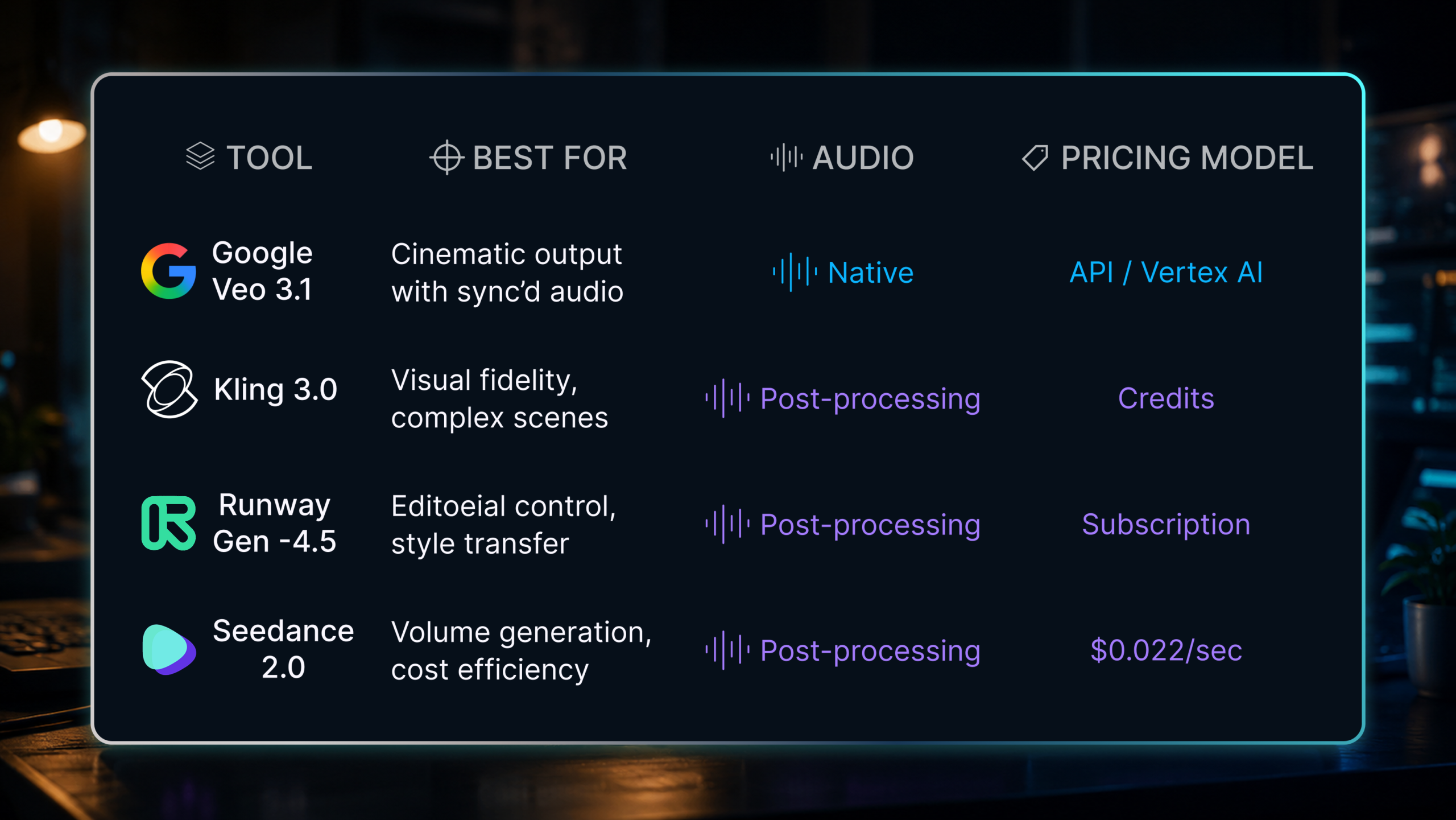
| Google Veo 3.1 | Cinematic output with sync’d audio | Native | API/Vertex AI |
| Kling 3.0 | Visual fidelity, complex scenes | Post-processing | Credits |
| Runway Gen-4.5 | Editorial control, style transfer | Post-processing | Subscription |
| Seedance 2.0 | Volume generation, cost efficiency | Post-processing | $0.022/sec |
AI video generation for business and corporate content
HeyGen, best for localized and personalized video at scale
HeyGen focuses on AI avatar video. Upload a recording of a presenter; HeyGen produces localized versions in 40+ languages with lip-synced AI voice. For global brands, L&D teams, or corporate communications that need the same content in six languages, HeyGen removes the cost of booking talent for each version.
Best for: Corporate communications, sales enablement, multilingual content, HR training that needs to scale across regions.
Synthesia, best for enterprise training and L&D
Synthesia is the enterprise standard for AI avatar video. Its 140+ language support, customizable avatars, and LMS integrations make it the default choice for training and e-learning production at volume. Enterprise plans include brand avatar creation from a custom recording.
Best for: Enterprise L&D teams, compliance training, e-learning studios producing at scale.
Lena managed training video production for a manufacturing company with operations across seven countries. Her team used to spend three weeks per training module: talent booking, studio time, localization, post-production. After switching to Synthesia, the same module takes three days to produce. The two-and-a-half weeks recovered didn’t disappear; they shifted to content development and stakeholder review. The bottleneck moved from production to approval, and that’s the pattern you’ll see across every team adopting ai video generation tools.
What about Sora?
OpenAI announced in April 2026 that Sora’s web and app experiences will be discontinued on September 24, 2026. API access continues for developers who have integrated Sora into custom workflows.
For production teams using Sora through its interface: the interface goes away in September. If your team relies on Sora’s app for iterative generation and visual exploration, begin transitioning to alternatives now. Google Veo 3.1, Runway Gen-4.5, and Kling 3.0 offer comparable or superior output quality for the use cases Sora’s interface supported.
The API continuation means Sora doesn’t disappear from the ecosystem; it becomes developer-only. If your team isn’t building on the API, you need a different ai video generation software before September 24.
What to do with AI-generated footage
Here’s the production problem that no best ai text to video software comparison covers: AI generation is fast, and that speed creates a new kind of client review problem.
A single Veo or Runway session can produce 10 distinct footage iterations in an afternoon. Each looks different. Each has different strengths. The client needs to pick one, or ask for a fourth round, or approve version three with changes on scene two. The volume of material requiring structured feedback grows faster than any email thread can track.
Jake ran creative production at a video agency in Denver. Before his team adopted AI generation tools, clients reviewed one rough cut per project. Production time was the natural throttle on iterations. After his team integrated Runway Gen-4.5 for B-roll and concept footage, they started presenting clients with three or four generated options per scene. Creative quality went up. So did the revision cycle.
Within six weeks, review time had doubled. Clients were emailing time-code references in the wrong format, mixing up which version they’d commented on, and requesting changes on footage that had already been replaced. The problem wasn’t the generation software; it was that his team had no system for collecting frame-accurate client feedback on AI-generated video iterations.
Video proofing software is what makes AI-generated footage manageable in a client-facing workflow. Krock.io lets you upload any format from any generation tool, share a review link, and collect frame-accurate comments tied to exact timestamps. When a client says “the sky color at 0:08 in version two,” that annotation lives at that timestamp, in that version, not buried in an email chain.
For teams managing multiple generated iterations, version comparison shows clients v1 and v3 side by side without switching tabs or renaming files manually. Approval tracking records who approved which version and when. There’s no per-reviewer seat fee, so looping in five client stakeholders doesn’t change the cost. Teams switching from Frame.io often do so because Frame.io alternatives charge per reviewer seat; that fee compounds fast when AI generation triples the number of versions going to review.
The best video review software for AI-generated content is whichever one your clients can navigate without a tutorial. That’s the friction that breaks approval cycles.
How to choose the right AI video generation software
Teams searching for the best ai for video generation often default to whichever tool has the flashiest demo reel. That’s the wrong instinct. Match the tool to the workflow requirement, not the sample reel. For the broader view of how AI has transformed video production across all four stages, AI in video production in 2026 covers the complete pipeline.
| If you need… | Start with |
|---|---|
| Cinematic 4K with synchronized audio | Google Veo 3.1 |
| Visual precision across complex scenes | Kling 3.0 |
| Editorial control and style direction | Runway Gen-4.5 |
| Volume generation at lowest cost | Seedance 2.0 |
| Localized avatar video in multiple languages | HeyGen |
| Enterprise training and L&D video | Synthesia |
Before selecting any ai video generator for production teams, plan the full workflow, not just the generation stage:
- Stage 1, planning: Lock in your visual logic before prompting. AI generation without a storyboard produces inconsistent results and wastes generation credits.
- Stage 2, generation: Choose the tool that fits your output requirement and volume.
- Stage 3, editing: AI-generated footage needs post-production work. The best AI video editing software handles the finishing pass.
- Stage 4, review: Structured feedback and version tracking, not email threads.
For the full pipeline from concept to client approval, the best AI video creation software guide maps every stage.
FAQ
What is the best AI video generation software for production teams?
For cinematic output with synchronized audio, Google Veo 3.1 leads. For visual fidelity in complex scenes, Kling 3.0 is strongest. Editors who want direct control over motion and style should use Runway Gen-4.5. Teams generating high volumes of B-roll get the best price-to-quality ratio from Seedance 2.0.
Is Sora shutting down in 2026?
OpenAI announced in April 2026 that Sora’s web and app interface will shut down on September 24, 2026. API access continues for developers with existing integrations. Teams relying on Sora’s app for iterative generation need to migrate to Google Veo 3.1, Runway Gen-4.5, or Kling 3.0 before that date.
Can AI-generated video be used in professional or commercial projects?
Yes, for specific tasks: B-roll, concept previsualization, animation replacement, and localized avatar video. AI generation still can’t reliably reproduce consistent talent across shots or handle complex multi-character scenes. Most production teams use it to accelerate specific stages, then finish with traditional editing and client review before delivery.
How much does AI video generation software cost?
Pricing varies by model. Seedance 2.0 charges $0.022 per second of generated video, the most cost-efficient option for high-volume use. Runway Gen-4.5 uses subscription pricing, Kling 3.0 runs on credits, and Google Veo 3.1 is available through API or Vertex AI access rather than a flat consumer price.
Conclusion
The best AI video generation software in 2026 produces footage you can use in professional deliverables. Google Veo 3.1, Kling 3.0, Runway Gen-4.5, and Seedance 2.0 each cover different production requirements at different price points. HeyGen and Synthesia handle the corporate and enterprise content category separately.
The teams getting real productivity gains from ai video generation software are the ones who’ve paired fast generation with a review process that keeps up. AI generates ten iterations in an afternoon; clients still need to pick one, annotate precisely, and approve a final version on record.
Krock.io handles the review and approval side of AI-generated video. Upload any format, share a link, get frame-accurate feedback, track approvals with no per-seat reviewer cost. Start free, no credit card required.



