




TL;DR: The best approval software for most creative and marketing teams is the one that doesn’t charge per external reviewer — Krock.io, Filestage, Planable, and PageProof all offer unlimited reviewers, while Wrike charges for every external or limited user. For creative and animation teams specifically, Krock.io is the strongest overall fit: multi-stage approvals, unlimited reviewers on every plan including free, and no $199-plus monthly floor to get started. Filestage is the better pick for compliance-heavy, multi-format campaigns; Planable for social and content calendars; PageProof for enterprise-scale audit export; Wrike only if approvals need to live inside a broader project-management tool.
Most approval software gets built for one of two jobs: routing generic business requests like PTO and purchase orders, or proofing a single file type like a PDF. Neither job is what a creative or marketing team actually needs when a video, a design, and a packaging mockup all have to clear the same client sign-off before a campaign ships.
Agree: You’ve probably used a tool that handles approvals in theory. It has a button that says “approve.” But it can’t tell you which version a client actually signed off on, it charges per reviewer seat the moment your client roster grows, or it treats a 30-second video the same way it treats a PTO request, as a line item with no context.
Promise: This is a straight breakdown of the six best approval software options in 2026, covering what an approval workflow needs to actually do, real pricing at scale, and which tool fits which kind of team.
Preview: We’ll cover the criteria that separate approval software built for creative work from generic business-process tools, a side-by-side comparison table, full reviews of all six platforms, real cost math, and a buying guide by team type.
If you want the pricing math first, Krock.io’s pricing page breaks down cost against Filestage, Frame.io, Wipster, and Ziflow at different team sizes.
What is approval software?
Approval software (also called approval management software, or review and approval software) is a tool that routes a piece of work, a video cut, a design file, a marketing asset, through a defined set of reviewers before it’s marked approved and released. Instead of chasing sign-off over email or Slack, the file moves through stages automatically, and everyone can see who approved what, and when. It overlaps closely with online proofing for creative teams, though proofing tools often stop at collecting feedback, while approval software also enforces who has to sign off before work ships.
The volume of work waiting for sign-off is growing fast: nearly two-thirds of marketers expect the demand for content to quintuple between 2024 and 2026, according to an Adobe survey of 2,841 marketers. More content means more approvals, and more places for them to stall.
An approval workflow is the specific path that file follows: who reviews first, what happens if changes are requested, and who holds final sign-off. Content approval works the same way for marketing copy, social posts, and campaign assets, one or more named approvers act on the piece before it can publish or ship.
What makes approval software actually work
Not all approval software solves the same problem, and the differences aren’t always obvious from a feature page. For a broader walkthrough of the process itself, see our 5 steps to a successful creative review and approval process.
Multi-stage approvals, not a single button
A real approval workflow has stages: internal creative review, then account manager, then client, for example. The asset can’t skip ahead. Several tools on this list only offer a flat “approve/reject” action with no way to enforce order, which means a client can approve a cut that an internal creative director hasn’t cleared yet.
The reviewer seat model (and its hidden costs)
This is where teams get burned. Some approval tools charge per seat for every person who needs to view or approve a file, including external clients. A marketing agency running quarterly campaigns for 15 clients, each with three or four stakeholders who need to sign off, can end up with 50-plus paid reviewer seats that have nothing to do with the agency’s own headcount.
Unlimited reviewers (external approvers never need a paid seat) changes how you structure sign-off. You stop routing feedback through one gatekeeper just to avoid a bill, and the actual decision-maker gets to approve directly.
Statuses that update automatically
Every asset should carry a clear status: in review, changes requested, or approved. If the team is manually tracking that in a spreadsheet next to the tool, the tool isn’t doing its job.
Version history tied to the approval, not just the file
When a client asks “wasn’t this already approved in v3?”, the answer needs to be one click away. That means version history has to be linked to who approved which version, not just a folder of uploaded files with timestamps.
An audit trail that survives a dispute
Every approval, rejection, and comment should be timestamped and attributed to a name. Approval is where teams lose the most time: 74% of marketing professionals say it takes more effort than the creative work itself (see our approval process statistics). That record matters when a client disputes what they signed off on, or a legal or compliance team needs proof a stage was actually completed — see our guide on how to submit a successful approval request for what a clean audit trail looks like in practice.
Multi-format support
Content approval and creative approval rarely stay inside one file type. A single campaign can include a video, three static ads, and a packaging mockup. Tools that only handle one format force teams to run parallel approval processes for the same launch. If most of your work is static creative, our roundup of design review tools goes deeper on that side.
A note on how we evaluated these tools: the pricing, seat policies, and feature details below come from each vendor’s own public pricing pages, verified live in September 2026, not a hands-on trial of every product. Krock.io’s own listing reflects its product team’s day-to-day use of the platform; the rest reflect current public information, checked for accuracy at the time of writing.
Quick comparison: best approval software in 2026
| Tool | Starting price | Free plan | External reviewers | Best for |
|---|---|---|---|---|
| Krock.io | $10/user/month | Yes (1 user, 2 projects) | Unlimited, no seat, no login | Creative and animation teams |
| Filestage | $199/month (10 seats) | Yes (1 project, 5 files/mo) | Unlimited, no seat | Multi-format marketing proofing |
| Wrike | $10–$25/user/month | Yes (basic task management) | Requires a paid seat | Enterprise project management |
| Air | Not publicly listed | No | Not specified | Creative teams needing DAM plus review |
| Planable | $33–$49/workspace/month | Yes (50 posts) | Unlimited, no seat | Social and content marketing approval |
| PageProof | $249/month | No (trial only) | Unlimited, no seat | Marketing and brand proofing at scale |
Best approval software: full breakdown
1. Krock.io: best for creative and animation teams
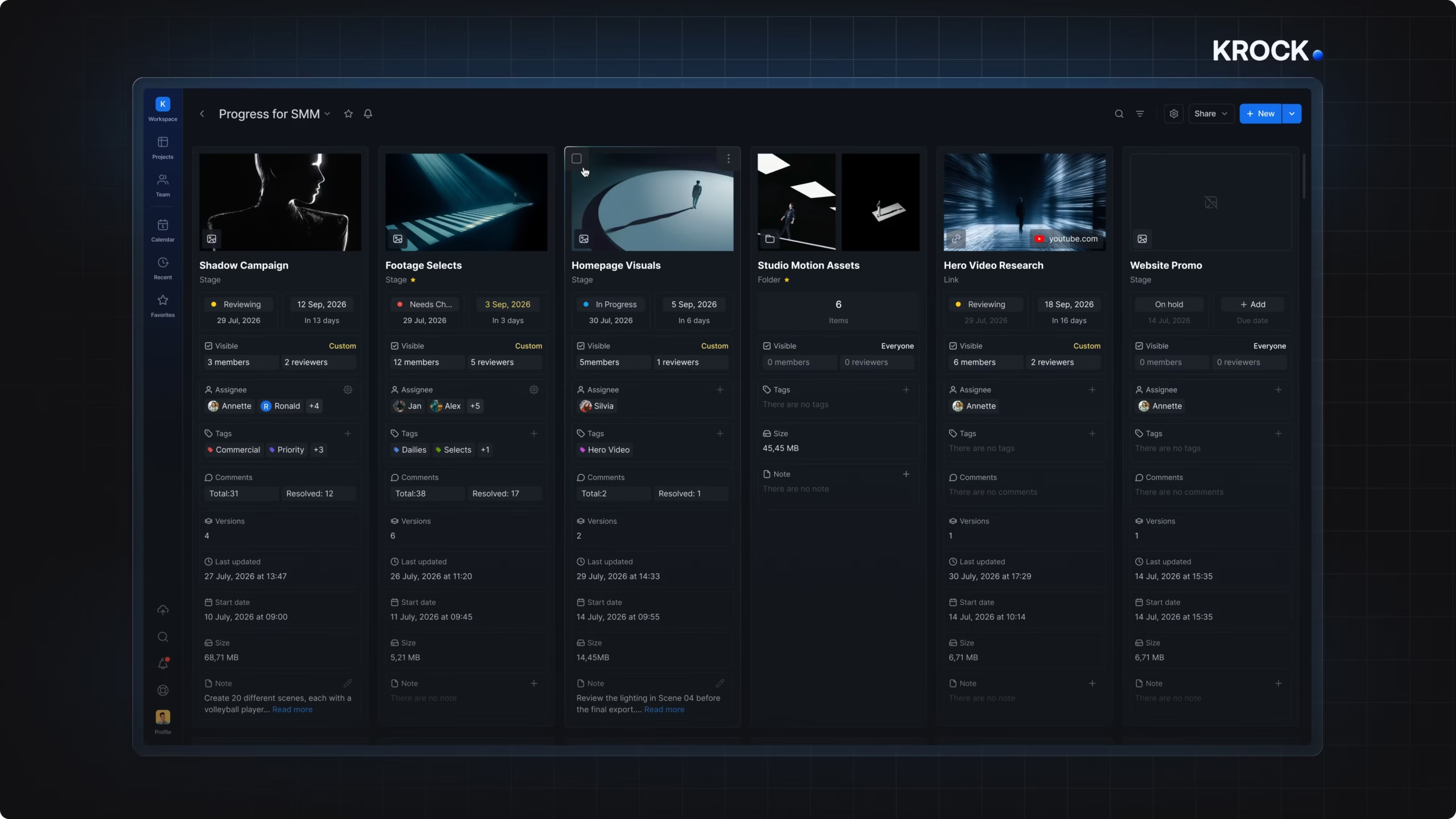
Krock.io is creative approval software built around a real approval workflow, not a generic approve button. You define stages, assign approvers to each one, and the asset can’t move forward until the current stage clears. It also covers frame-accurate video feedback; see our video review software comparison for how it stacks up there.
Multi-stage approvals with clear statuses
Set up as many stages as a project needs, internal review, then account manager, then client. Each asset carries a status, in review, changes requested, or approved, that updates automatically the moment an approver acts, so nobody has to ask what’s holding up a launch.
Version history and audit trail
Every version and its comment thread stays intact. Every approval decision is timestamped and attributed to a name, which holds up when a client disputes what they signed off on.
Unlimited reviewers on every plan
External clients approve using a link, no account, no paid seat, on the free plan and every paid tier. For an agency with 20 clients each sending several stakeholders to review a campaign, that’s the difference between a tool that scales and one that penalizes you for having more clients.
Multi-format review
Video, design, PDF, and audio all move through the same workflow, with frame-accurate annotation for video and drawing tools for static assets, so a campaign with mixed asset types doesn’t need a second tool.
Integrations
Native integration with Adobe Creative Cloud, DaVinci Resolve Studio, and Final Cut Pro means editors push a new version for approval without re-exporting.
Pricing
- Free: $0, 1 user, 2 projects, 2 GB storage, unlimited reviewers
- Pro: $10/user/month, unlimited projects, 4K playback, full integrations
- Enterprise: from $400/month for 100 users, flat pricing for larger teams
Start your free trial. No credit card required.
Who it’s for: Animation studios, video production agencies, and marketing teams that need one approval workflow across video, design, and campaign assets, without paying per reviewer seat.
Pros:
– Unlimited reviewers on every plan, including free
– No $199-plus monthly floor to get started, scales from a single seat
– Multi-stage approvals with named approvers per stage
– Adobe Creative Cloud, DaVinci Resolve Studio, and Final Cut Pro integrations
– Built-in storyboard and animatic review ahead of the approval stage
Cons:
– Free plan storage (2 GB) is tight for teams working in 4K
– Fewer third-party integrations than Filestage for teams outside video and design (e.g., legal document approval)
2. Filestage: best for multi-format marketing proofing
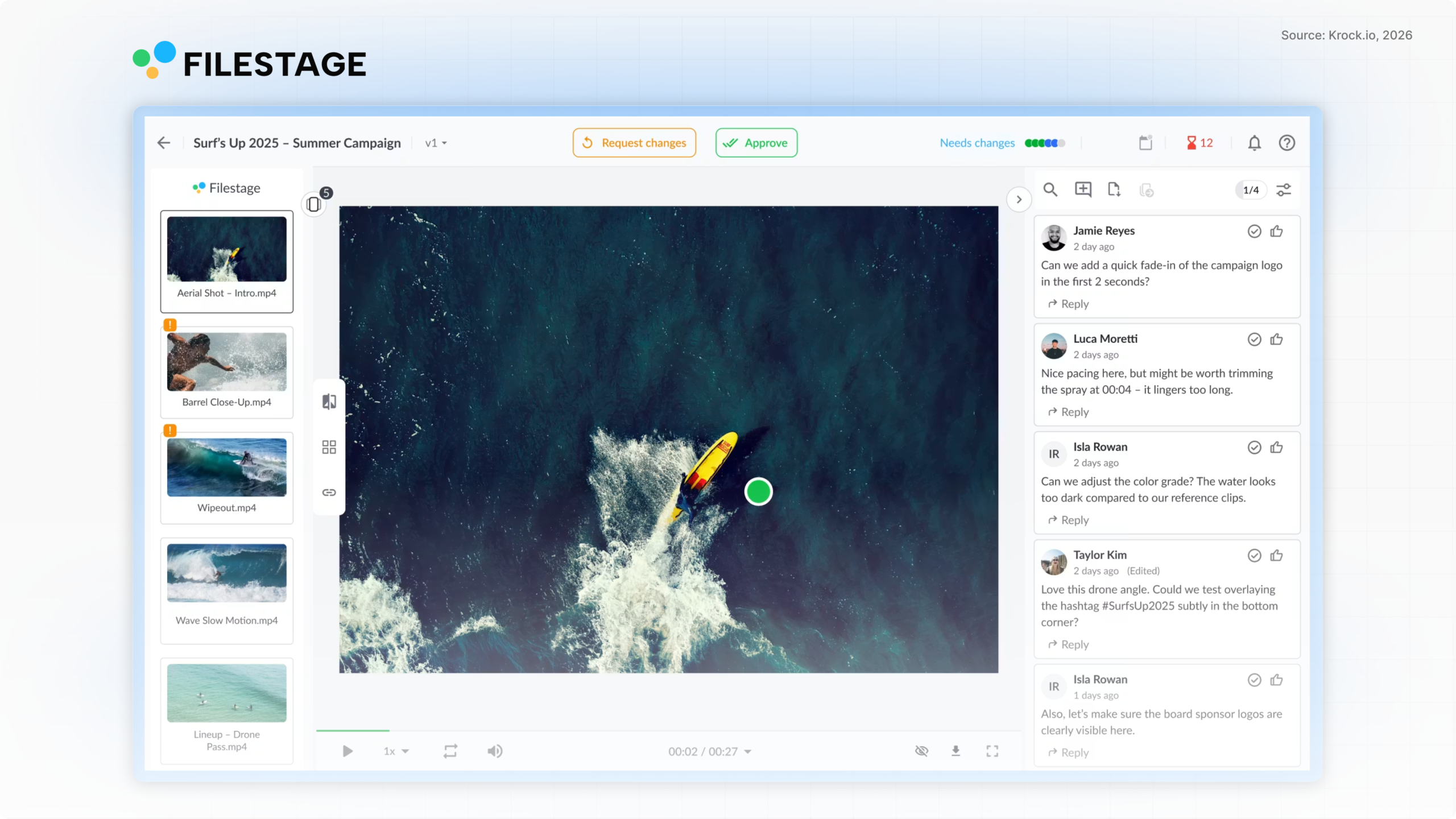
Filestage takes the broadest approach to approval on this list. It handles video, image, PDF, live websites, and audio in one workflow, with structured approval stages built for marketing, brand, and legal teams who each need to sign off in sequence.
Structured approval stages and reviewer groups
Filestage lets you set up reviewer groups per department, so creative, legal, and brand approvals run in a defined order rather than everyone commenting on the same open thread. External reviewers approve without creating an account, matching Krock.io on that point.
Compliance depth
Filestage markets specific compliance features, including audit logs aimed at FDA 21 CFR Part 11 and EU Annex 11 requirements, which gives it real traction with regulated industries like pharma and consumer goods.
Where the cost adds up
The Starter plan is $199/month and includes 10 seats, additional seats come in bundles of five. That’s a real floor for a small team, a two- or three-person studio pays agency-scale pricing just to get started. The free plan is capped at one active project and five new files per month, useful for evaluating the tool, not for running real work.
Pricing
- Free: $0, 10 team members, 1 active project, 5 files/month
- Starter: $199/month, 10 seats included
- Business: $329/month, adds review agents and automations
- Enterprise: custom, adds SSO and audit logs
Who it’s for: Marketing and brand teams managing multi-format campaigns with legal or compliance sign-off requirements, and teams large enough to absorb the $199/month floor.
Pros:
– Multi-format review (video, image, PDF, website, audio)
– Unlimited external reviewers, no seat cost
– Compliance-oriented audit trail
– Free plan available for small-scale testing
Cons:
– $199/month minimum makes it expensive for very small teams
– Free plan capped at 1 project and 5 files/month
– No storyboard or pre-production tools for video-first teams
3. Wrike: best for enterprise project management with approvals built in
Wrike is a full project management platform with approvals as one feature among many. If your organization already runs Wrike for task management, adding approval workflows on top is a low-friction option. If you’re weighing Wrike against a creative-first tool, see how Krock.io compares to Wrike.
Approval features inside a broader platform
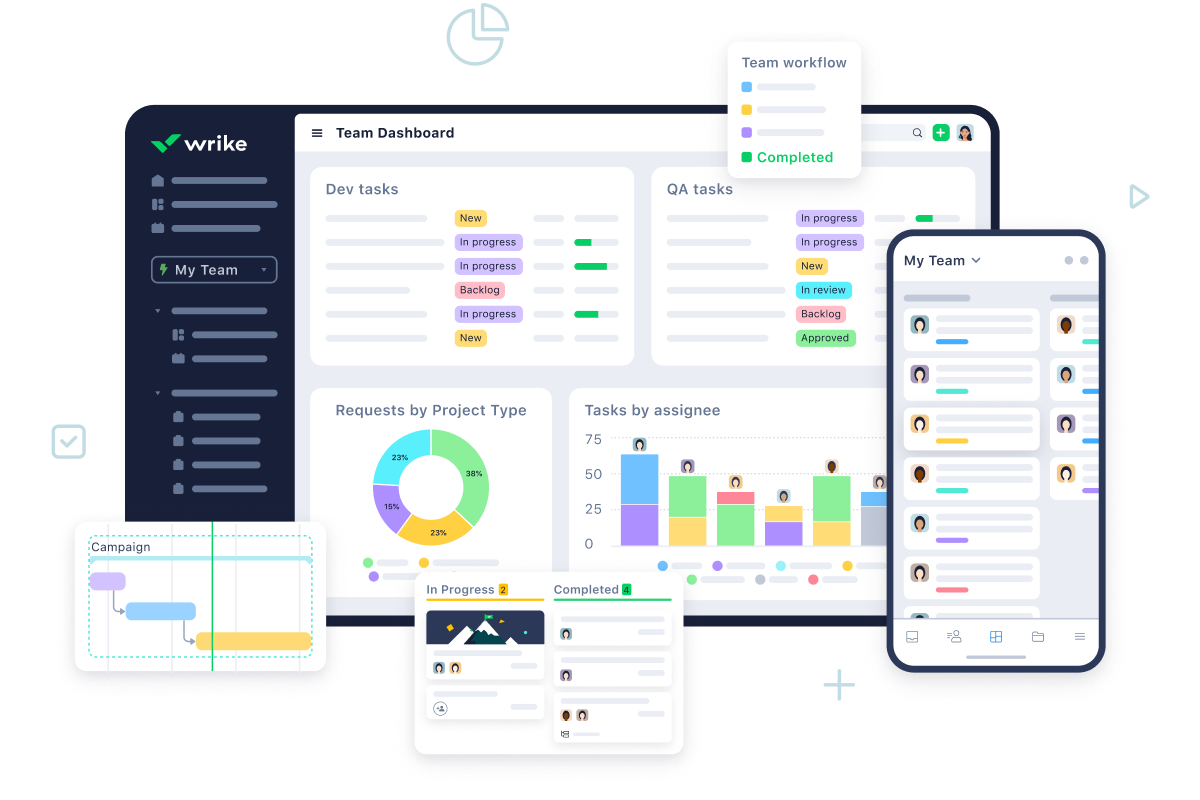
Wrike lets teams attach approval steps to tasks, folders, or projects, with dashboard visibility into pending approvals, due dates, and decision records showing who approved or rejected and why. It integrates approvals into the same workflow as task tracking, which suits organizations managing approvals alongside general project work rather than as a standalone process.
Where it falls short for creative teams
Wrike’s approval flows are built for generic business processes, budgets, vendor sign-off, campaign task approval, not specifically for creative assets. There’s no audio annotation, no storyboard tooling, and external or limited users require a paid seat to participate, which reintroduces the per-reviewer cost problem that unlimited-reviewer tools solve. Wrike’s pricing page confirms per-user rates starting at $10/month.
Pricing
- Free: $0, basic task management
- Team: $10/user/month
- Business: $25/user/month
- Enterprise tiers: custom pricing
Who it’s for: Organizations that already run project management in Wrike and want approvals folded into the same platform, rather than teams whose primary need is creative asset review.
Pros:
– Deep integration with broader project management features
– Strong trust signals (20,000-plus organizations, 4.5-star rating on 13,000-plus reviews)
– Approval dashboard with 360-degree visibility
Cons:
– External and limited users need a paid seat
– Not built for video or design-specific annotation
– No free-tier equivalent to unlimited reviewers
4. Air: best for creative teams that also need asset management
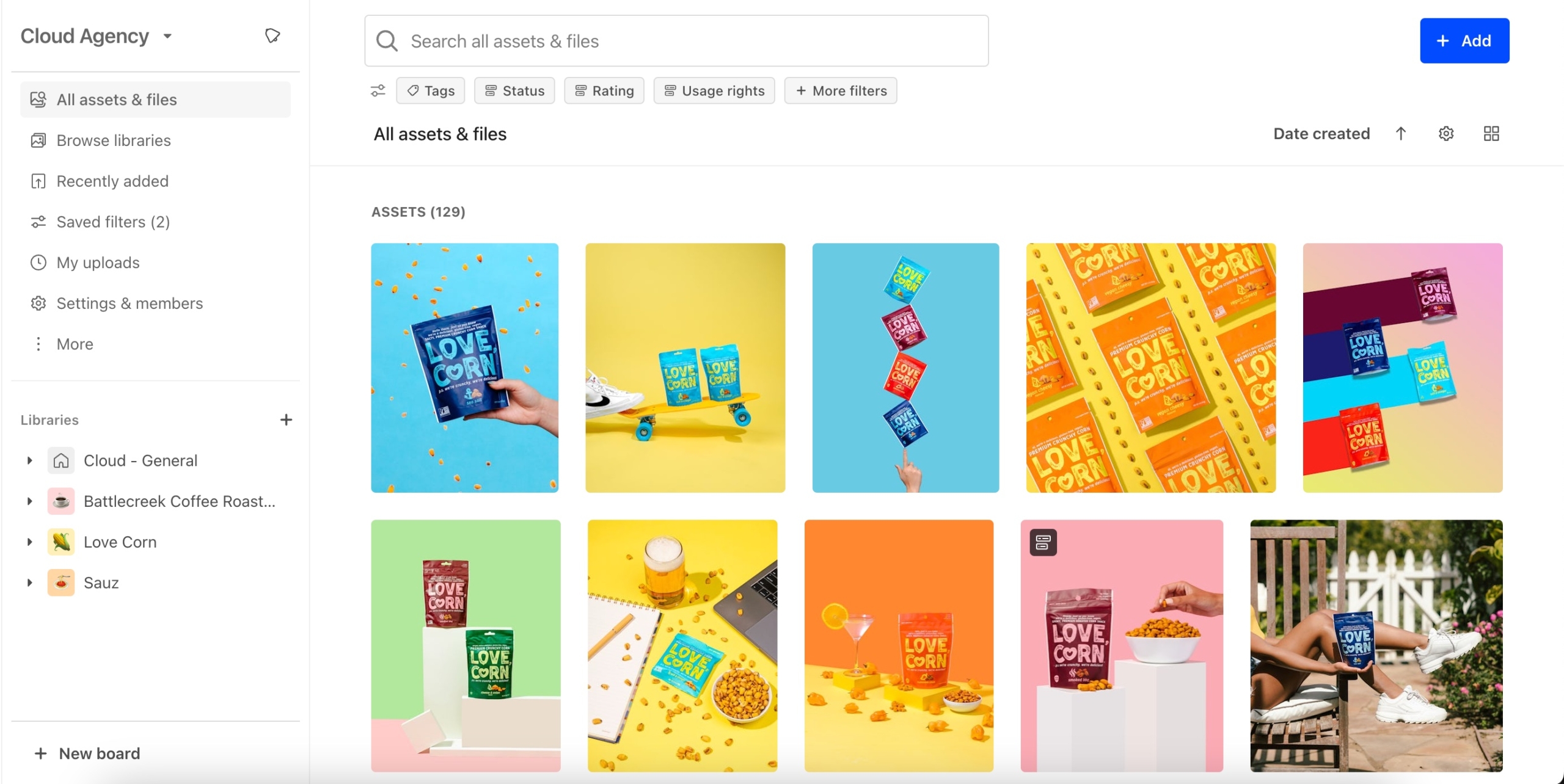
Air combines a digital asset management library with review and approval, positioning itself around how creative teams actually work rather than generic business process.
Creative-native approval stages
Air organizes work through draft, review, and approved stages, with pinpointed feedback directly on images and video timelines, and version history that shows who approved what and when. The language and workflow feel built for design and video teams specifically, closer to Krock.io’s approach than Filestage’s proofing-tool framing.
What’s missing
Air’s page has no FAQ section and no visible pricing or comparison table, so evaluating cost or getting quick answers to definitional questions requires booking a demo first. There’s also no mention of audio annotation or storyboard/pre-production tools.
Pricing
Not publicly listed. Air requires contacting sales or booking a demo to get pricing.
Who it’s for: Creative teams that want asset management and approval combined in one platform and are comfortable going through a sales conversation to evaluate pricing.
Pros:
– Creative-native workflow language (draft, review, approved)
– Pinpointed feedback on images and video timelines
– Asset management built into the same platform as review
Cons:
– No public pricing or free plan
– No FAQ or comparison content on the product page
– No audio annotation or pre-production tooling
5. Planable: best for social and content marketing approval
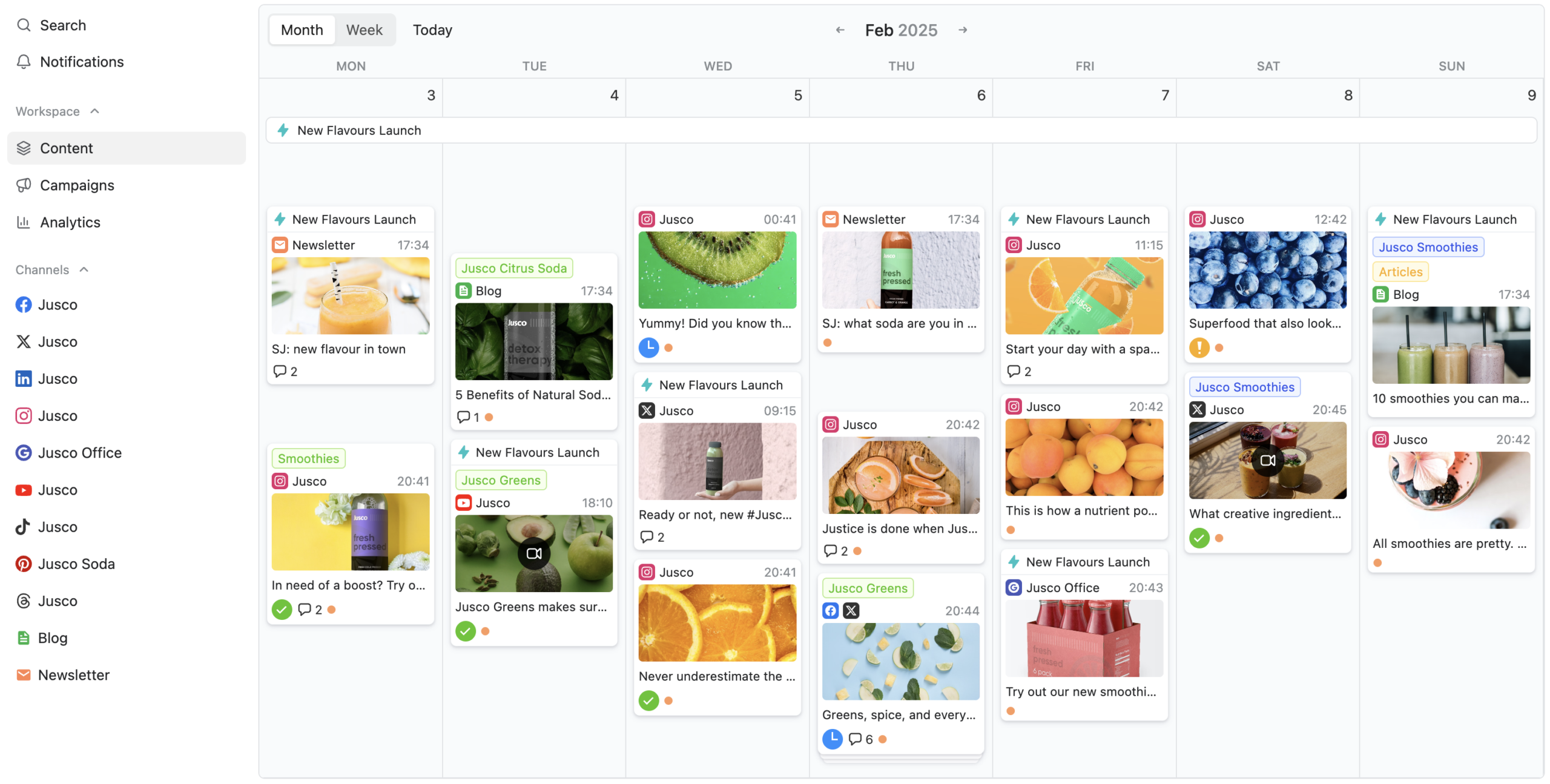
Planable is content approval software built specifically around social media approval, scheduling posts and campaigns through defined approval types before they publish.
Approval types by plan
The Basic plan supports “None” and “Optional” approval, meaning sign-off isn’t enforced. The Pro plan adds “Required” approval, so at least one approver must sign off before a post can publish. Enterprise adds multi-level approvals, letting content pass through team lead, then client, then legal in sequence, only publishing once everyone has signed off.
Where it fits
Planable is scoped to content and social calendars rather than video or design-heavy campaigns. For a team whose approval bottleneck is specifically social posts and content calendars, the workspace-based pricing (unlimited users per workspace) can be more predictable than per-seat tools.
Pricing
- Free: $0, 50 posts, no time limit
- Basic: $33/workspace/month
- Pro: $49/workspace/month
- Enterprise: custom, adds multi-level approvals
Who it’s for: Social media and content marketing teams whose approval workflow is scoped to posts and calendars rather than video or design files.
Pros:
– Free plan with no time limit
– Workspace pricing means no per-seat cost as teams grow
– Multi-level approval sequencing on Enterprise
Cons:
– Required approval only available on paid plans
– Not built for video or design file review
– Multi-level (multi-stage) approvals locked to the top-tier Enterprise plan
6. PageProof: best for marketing and brand proofing at scale
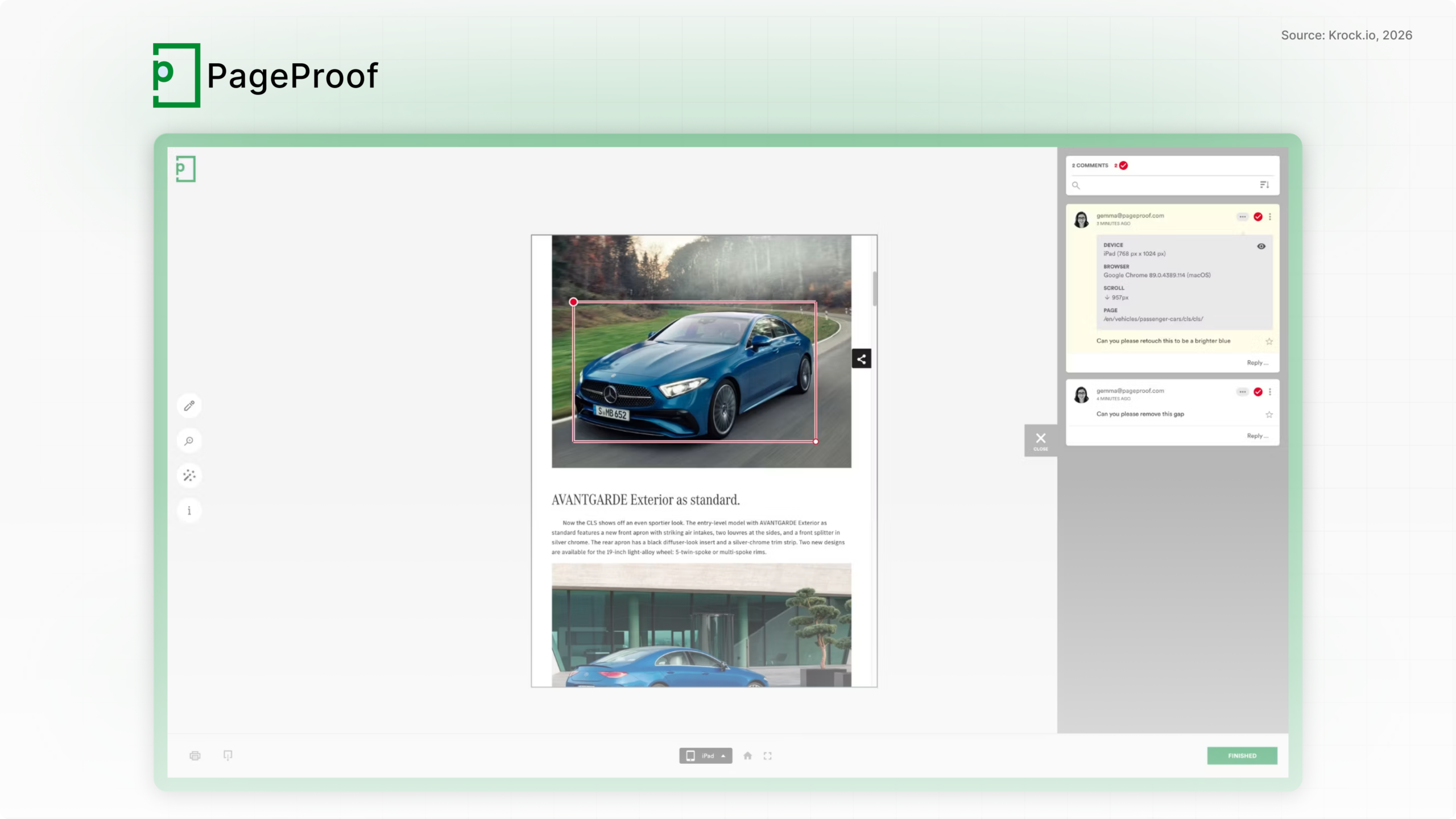
PageProof is online proofing software built for reviewing marketing creative at volume, with every plan including unlimited reviewers and version control. See our online proofing software guide for a broader look at the category beyond approval-specific tools.
Unlimited reviewers, enterprise-oriented features
Like Krock.io and Filestage, PageProof doesn’t charge for external reviewer seats on any plan. Its differentiation shows up at the top tier: digital signing, full audit and compliance export, and automated brand-rule checking on assets are Enterprise-only features.
The cost floor
There’s no free plan, only a trial. The Team plan starts at $249/month, higher than Filestage’s Starter and well above Krock.io’s per-user entry point, which makes PageProof better suited to teams with volume and budget to match rather than small studios. If you specifically need free online proofing software, Krock.io and Filestage both have real free tiers with proofing built in; PageProof does not.
Pricing
- Team: $249/month
- Team Plus: $499/month
- Enterprise: custom pricing
Who it’s for: Marketing and brand teams proofing high volumes of creative who need audit and compliance export features and have the budget for a $249-plus monthly floor.
Pros:
– Unlimited reviewers on every plan
– Digital signing and compliance export at the Enterprise tier
– Automated brand-rule checking on assets
Cons:
– No free plan, trial only
– $249/month minimum is high relative to per-user tools
– Not creative-production-specific (no video or storyboard tooling)
How much does approval software actually cost?
The sticker price and the real price diverge fast in this category, mostly because the tools on this list price themselves differently: per user, per workspace, or per project. For a plan-by-plan view against Frame.io, Ziflow, Filestage, and Wipster, see our honest pricing comparison.
Per-seat vs. flat and workspace pricing
Krock.io and Wrike price per user, $10/user/month for both at the entry tier. Filestage and PageProof price around a seat bundle or flat monthly fee ($199 and $249 respectively) rather than a low per-user rate, which makes them cheaper at large scale but expensive to start. Planable prices per workspace, so a small team pays the same $33/month whether it has three people or ten.
The external reviewer trap
The bigger cost driver is what happens with reviewers outside your core team. Wrike requires a paid seat for external or limited users. Krock.io, Filestage, and PageProof all offer unlimited reviewers at no extra cost, on every plan. For an agency with a dozen active clients, each sending multiple stakeholders to approve a campaign, that difference alone can be worth more than the base subscription price. That’s the hidden cost of client approval software that charges per reviewer. If client feedback itself is the bottleneck, our guide to collecting client feedback covers the process side.
Real cost at small-team scale
For a two-person studio just getting started:
- Krock.io: $10–$20/month (1–2 users on Pro), unlimited reviewers included
- Filestage: $199/month minimum, even at 2 users, because Starter includes 10 seats regardless of how many you use
- Wrike: $20/month (2 users on Team), plus paid seats for any external reviewer
- Planable: $33/month flat, workspace-based
- PageProof: $249/month minimum, no smaller tier available
Teams under five people pay a meaningfully different price depending on whether the tool bills per seat with no minimum, or bills a flat rate designed around a 10-person team.
How to choose the right approval software
The right tool depends on what’s actually moving through your approval process and who needs to sign off on it.
For animation studios and video production teams
You need frame-accurate video annotation, storyboard and animatic review ahead of the approval stage, and unlimited reviewers so clients can sign off without a seat cost. Best fit: Krock.io.
For marketing and brand teams running multi-format campaigns
For marketing approval software, the deciding factor is format coverage. You need video, design, PDF, and packaging artwork moving through the same workflow, often with legal or compliance sign-off. With 55% of creative teams moving toward in-house agency models (Cella, 2025), more marketing teams now run agency-style approval rounds internally, with brand, legal, and product all signing off. Best fit: Filestage for compliance-heavy campaigns, or Krock.io if video is the primary format and cost per seat matters more than compliance certifications.
For social media and content teams
Your approval bottleneck is scoped to posts and calendars, not files. Best fit: Planable.
For organizations already standardized on a project management platform
If approvals need to live alongside general task tracking across departments, not just creative sign-off. Best fit: Wrike.
For large enterprises needing audit and compliance export
If digital signing and formal audit export matter more than cost per seat. Best fit: PageProof or Filestage’s Enterprise tier.
Frequently asked questions
What is approval workflow software?
Approval workflow software routes files or content through a defined sequence of reviewers before final sign-off. It tracks status (in review, changes requested, approved), enforces the order approvers act in, and keeps a record of who approved what, replacing manual tracking over email or spreadsheets.
How does content approval work?
Content approval software moves an asset, video, design, or marketing copy, through assigned reviewers one stage at a time. Each reviewer either approves it or requests changes. The content can’t move to the next stage or go live until every required approver at the current stage signs off.
Is there free approval software?
Yes. Krock.io’s free plan includes multi-stage approvals, unlimited reviewers, and 2 projects with no credit card required. Filestage and Planable also offer free tiers, though Filestage’s is capped at 1 active project and Planable’s at 50 posts. PageProof doesn’t offer a free plan, only a trial.
Do external reviewers need to pay for a seat?
It depends on the tool. Krock.io, Filestage, Planable, and PageProof all let external reviewers approve for free, without an account, on every plan. Wrike requires a paid seat for external or limited users, which changes the real cost of inviting clients to review.
What’s the difference between approval software and project management software?
Project management software tracks tasks and deadlines generally. Approval software is built specifically for the review-and-sign-off step, with version comparison and status tracking suited to creative or content assets rather than generic task cards. Some tools, like Wrike, combine both.
What is marketing approval software?
Marketing approval software routes campaign assets such as ads, videos, social posts, and landing pages through required reviewers like brand, legal, and the client before anything goes live. It records who approved which version, so launches don’t stall in email threads and nobody ships an unapproved file.
What is the best creative approval software for video teams?
For video and animation teams, Krock.io is the strongest fit: frame-accurate comments, multi-stage approvals, version comparison, and unlimited reviewers on every plan, including free. Filestage and PageProof handle video too, but they’re built primarily around documents and static marketing assets.
Picking the right tool comes down to one question
Count how many people outside your core team need to approve your next project. Then check whether the approval software you’re considering charges those people as paid seats.
If it does, you’ll either pay more than the headline price, or you’ll route feedback through fewer people to avoid the cost, which adds revision rounds instead of removing them. Krock.io, Filestage, Planable, and PageProof all avoid that trap with unlimited reviewers. Wrike doesn’t, but it solves a different problem: approvals folded into broader project management.
For creative and animation teams specifically, the best approval software isn’t the one with the longest feature list. It’s the one that enforces stages in order, keeps an audit trail that survives a client dispute, and doesn’t charge extra the moment your client roster grows.
Krock.io offers a free plan and a 7-day Pro trial, no credit card required. Start your free trial and see how multi-stage approvals work on real video and design assets, or compare Krock.io’s full pricing against Filestage, Frame.io, Wipster, and Ziflow first.



