

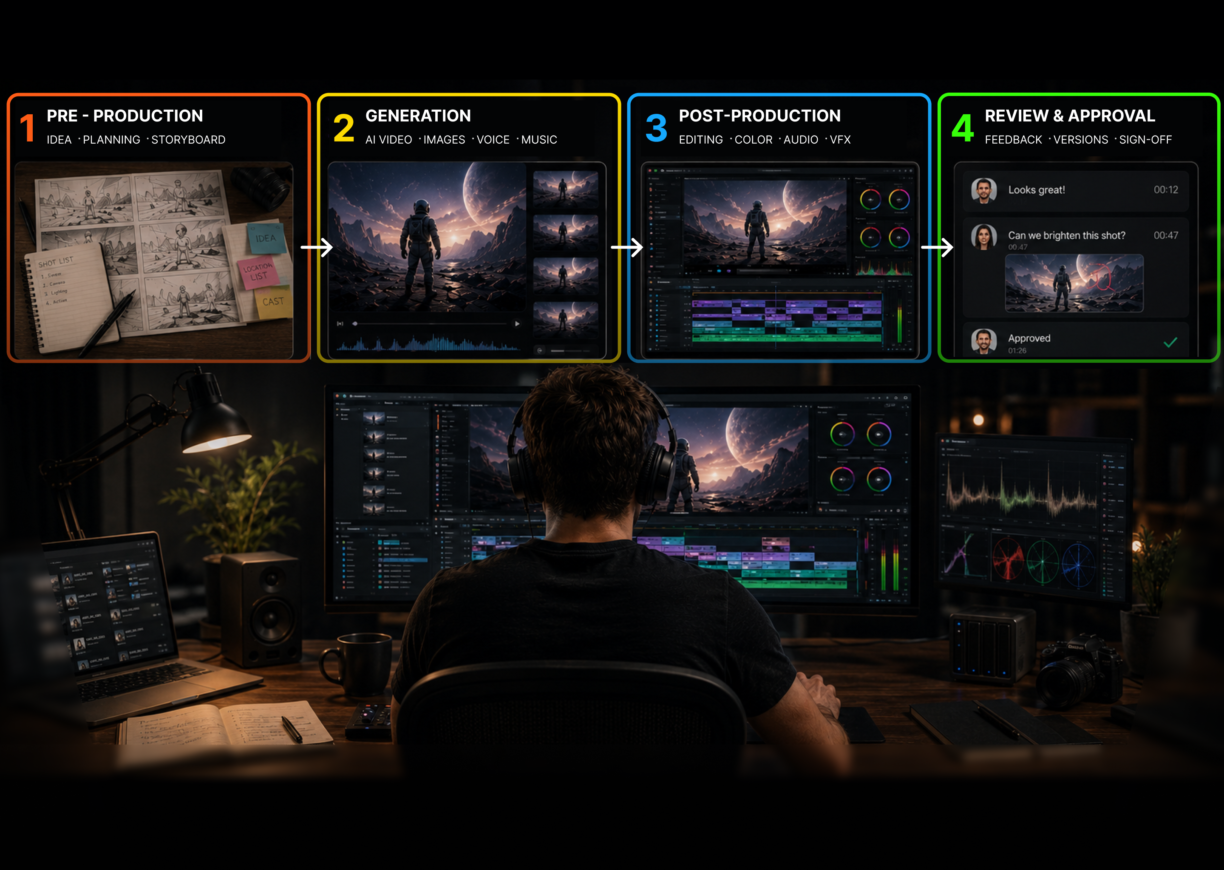


The current state of AI in video production: AI now covers four distinct production stages, pre-production planning, video generation, post-production editing, and review and approval. Each stage has mature tools. The biggest impact isn’t any single tool; it’s what happens when AI accelerates the first three stages and the fourth stage (client review) stays the same.
AI in video production has changed more in the past 18 months than in the previous five years. Not in hype, in actual workflow. Text-to-video models now produce 4K footage with synchronized audio from a single prompt. AI editing tools have moved from novelty filters into the NLE timeline. AI storyboarding turns a script into visual panels in under 20 minutes.
The question for production teams is no longer whether AI belongs in the workflow. It’s which tools belong at which stage, and how to handle the output volume that AI creates.
What AI in video production actually covers
Artificial intelligence in video production is any application of AI at a specific stage of the production pipeline. It’s not a single tool or a single category. In 2026, AI covers four distinct stages, and the best tools are specialized for each one.
The four stages:
- Pre-production: AI storyboarding and visual planning. Turning scripts and concepts into shot sequences before a frame is generated or shot.
- Video generation: Text-to-video, image-to-video, AI avatar. Producing footage from prompts rather than cameras.
- Video editing: AI-assisted rough cuts, color matching, noise reduction, multi-format delivery.
- Review and approval: Structured client feedback, version management, and formal sign-off.
Each stage has changed significantly. What hasn’t changed is the approval process at the end, and that’s where most teams run into trouble.

Stage 1: AI in video pre-production
Pre-production is where AI saves the most time per dollar spent. A storyboard session that used to take two days of manual drawing now takes 20 minutes with AI generation. More importantly, working from a storyboard before generating or shooting footage reduces revision cycles at every stage that follows.
Anton ran production at a video agency for six years before adopting AI tools. In 2024, his team started generation sessions cold from a brief. Every project involved two or three rounds of “this isn’t what we imagined” feedback from clients after generation. In 2026, the same team starts every project with an AI storyboard shared with the client for approval before a single clip is generated. The concept revision round disappeared. Generation sessions now produce usable footage on the first attempt instead of the third.
Krock.io’s AI storyboard maker generates storyboard panels from text prompts inside the same platform used for review and client approval. Teams that lock in visual direction before generating or shooting reduce the most expensive revision stage: catching story and framing problems after footage already exists.
Stage 2: AI video generation tools

AI video generation is where the category has moved fastest. Tools that produced obvious CGI artifacts in 2024 now output footage that passes a casual glance as real camera work in 2026.
The current best tools for production teams:
| Tool | Best for | Key capability |
|---|---|---|
| Google Veo 3.1 | Cinematic output | Synchronized audio native to generation |
| Kling 3.0 | Visual fidelity | Multi-shot character and scene consistency |
| Runway Gen-4.5 | Editorial control | Motion brushes, style transfer, timeline editing |
| Seedance 2.0 | Volume generation | $0.022/sec, production-grade output |
| HeyGen | Localized avatar video | 40+ languages, lip-synced AI voice |
| Synthesia | Enterprise training | 140+ languages, LMS integration |
For production use, AI video generation is most valuable for B-roll, concept visualization, pre-visualization before a shoot, and localized or personalized video at scale. It’s not a reliable replacement for brand-consistent talent or complex narrative scenes with multiple interacting characters.
The practical challenge with AI video generation isn’t the quality of output. It’s the volume. A single session can produce 10 usable footage variants in an afternoon. Each looks different. Each might be the right choice for a different use case. And every one of them needs client review.
For a full comparison of generation tools including audio capability and per-second pricing, the best AI video generation software guide covers each tool in depth.
Stage 3: AI in video editing
AI in video editing has matured from gimmick to genuine production tool. The three AI capabilities that hold up at professional scale in 2026:
Rough cut acceleration on interview footage. AI can analyze a 90-minute interview, identify the highest-quality segments by clarity and energy, and produce a rough assembly cut in minutes. Editors still make the final calls on pacing and story, but the starting point is dramatically better than raw footage.
Audio cleanup. AI noise reduction and dialogue enhancement work well on footage shot in challenging conditions: field interviews, corporate locations, events. The output isn’t always broadcast-perfect, but it’s consistently better than the source.
Color matching across multicam. AI color matching in DaVinci Resolve and Adobe Premiere Pro brings multicam footage to a consistent baseline before manual grading. For teams shooting with two or three cameras in the same scene, this removes hours of preliminary grading work.
What AI editing doesn’t do: it doesn’t make editorial decisions. It doesn’t know that the line at 4:22 is the emotional peak of the interview. It doesn’t understand why the 14-second version of a shot matters more than the 9-second version. The acceleration is real; the judgment still requires a human editor.
The best AI video editing software guide covers Adobe Premiere Pro, DaVinci Resolve, Descript, and VEED in detail for professional teams.
Stage 4: The bottleneck AI in video production can’t fix
Here’s what most AI in video production articles miss: AI makes the first three stages faster. It doesn’t touch the fourth.
Dana produced brand video for a consumer goods company. Her team used to spend a week on pre-production, two days on generation, and three days on editing. Twelve working days total before the first client review. After adopting AI tools across all three production stages, the same pipeline took four working days. Her team was genuinely faster.
But the client review process that used to happen once per project now happened four times. Because the team could produce three cut options instead of one, and two format variations, clients had more decisions to make, more versions to compare, and more feedback to give. The four-day production pipeline was followed by a nine-day approval process. The total project time barely changed.
The reason is structural. AI generation and editing tools don’t include any mechanism for collecting organized client feedback. When you export a cut from Premiere or render a generation session from Runway, you still face the same problem you always faced: where do clients watch it, how do they annotate specific moments, how do you track which version is current, and how does the editor know when something is formally approved?
Video proofing software is what makes AI-generated and AI-edited content manageable in a client-facing workflow. Krock.io lets teams upload any format from any production tool, share a review link, and collect frame-accurate comments tied to exact timestamps. Version comparison shows clients v1 and v3 side by side. Approval tracking records who approved which version and when. There’s no per-reviewer seat fee, so looping in five stakeholders doesn’t change the cost.
The best video review software for AI production output is whichever one your clients can navigate without a tutorial. That’s the barrier that determines whether faster production translates into faster delivery.
The AI video production stack in 2026
For teams building an end-to-end AI video workflow, the tools break down by stage rather than by category:
| Stage | What AI does | Where Krock.io fits |
|---|---|---|
| Pre-production | Storyboard generation, visual planning | Storyboard creation and client approval in one platform |
| Generation | Text-to-video, avatar video, B-roll | Review and approval of generated footage iterations |
| Editing | Rough cuts, color matching, audio cleanup | Review and approval of edited cuts |
| Client review | Frame-accurate feedback, version comparison, approval tracking |
The best AI video creation software guide maps the full pipeline including tool selection at each stage and how the stages connect.
What AI in video production still can’t do
AI in video production is genuinely useful across pre-production, generation, and editing. It’s worth being clear about where the limits are in 2026:
- Brand-consistent talent: AI generation can’t reproduce a specific person’s face, voice, or mannerisms reliably across shots without purpose-built avatar training. Avatar tools like HeyGen and Synthesia solve this for a specific presenter, but general-purpose generation does not.
- Complex narrative: Multi-character scenes with meaningful interaction, physical contact, or rapid movement still produce artifacts. AI generation is strongest on single-subject footage, B-roll, and structured scenes.
- Editorial judgment: Knowing which take to use, when a scene needs to breathe, how to pace a cut for emotional impact. AI assists with assembly; it doesn’t make those decisions.
- Client approval: No AI tool manages the conversation of getting a client to formally sign off on a deliverable. That process still requires a human, a review tool, and a clear approval record.
The teams getting the most out of AI in video production aren’t the ones using the most tools. They’re the ones who’ve matched the right AI tool to each production stage and built a review process that keeps up with the output.
Conclusion
AI in video production in 2026 is a four-stage pipeline question, not a single tool question. Generation, editing, and storyboarding have all matured to the point where professional teams can integrate them into standard workflows. The productivity gains are real.
The teams who actually ship faster are the ones who’ve also updated how they handle client review. AI makes 10 footage variants in an afternoon; clients still need to pick one, annotate precisely, and approve a final version on record.
Krock.io handles the review and approval side of AI video production. Upload any format, share a link, get frame-accurate feedback, track approvals with no per-seat reviewer cost. Start free, no credit card required.



